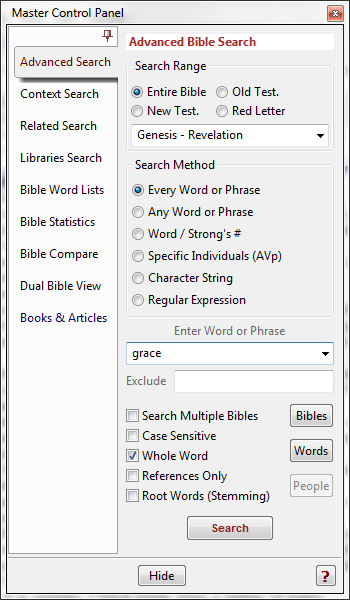
The first Tab in the Master Control Panel is Advanced Bible Search.
Hint:
The Pin Button immediately above the tab will Hide/Show the column of tabs,
making the display area larger.
To make a search, enter a word, words, or phrase into the entry box in the Search
Control, select the search range and method, and click Search or hit Enter.
The first option for Every Word Instance searches is the range of text to be searched. Bible Analyzer can search both contiguous and non-contiguous ranges of a text.
For convenience in selecting common ranges, four buttons are available to select,
· Entire Bible
The whole selected Bible is searched for a match.
· Old Testament
Only the Old Testament is searched.
· New Testament
Only the New Testament is searched.
· Red Letter
Only the Red-Letter words of Christ are searched.
Selecting a button will update the Search Range Entry to the desired range.
Custom ranges can be entered into the Search Range Entry for very powerful
searches.
Contiguous Ranges
Searching contiguous book range(s) is straight-forward. To search a single book, type
only the book name (most conventional abbreviations will also work). Gen will search
only Genesis. The same is for chapters (Gen 3). The following examples illustrate
ranges between books, chapters, and verses:
Gen - Lev
Gen 1 - Lev 10
Mat 2:5 - Luk 12:12
Any combination of references can be used,
Mat - Luk 12:12
will set a range of Mat 1:1 to Luk 12:12. Proper word case and periods are not required.
Non-Contiguous Ranges
Non-contiguous ranges must be separated by a comma, thus entering
Gen 5-10, Lev 10-12, Mat 5-7
will search only those chapters. As above any combination of books, chapters, and
verses can be used thus searches can become quite sophisticated.
Gen 5:5 - 20, Mat 5 - 7:15, Rom 4:5 - 8:20, Heb
Invalid Entries
What will not work is Mat 5:10-20 meaning verses. The parser in Bible Analyzer
will interpret the 20 as chapter 20. The way to properly form an entry for verses is Mat 5:10-5:20. Another example of an invalid entry is 1-3 John. The accepted
method is 1Jo-3Jo, etc.
There is a drop-down history so previously entered ranges can be retrieved.
Tip:
There are some common non-contiguous ranges permanently in the list as well
(John's, Paul's, Moses's, and Luke's writings).
Search Methods available:
Every Word/Multi-Single Word
With this option each word or phrase entered must be found in a verse to get a result. If joy bless is entered, both words must be found in a single verse to get a result. If "born
again" seed is entered, the phrase and word both must be found. This is also known as
a Boolean AND search.
Note:
With this method and the following Any Word or Phrase method, quotation
marks must be placed around each phrase to make the words be treated as
single group.
The Multi-Single Word feature will list all verses that have a single word or phrase a
specified number of times. For instance, entering holy 2 will only list verses that have the
word holy two times or more. Entering holy 3 will list verses with the word three times or
more.
Tip:
If two words or more are listed before the number such as holy lord 2, Bible
Analyzer will display the verses which have the first word the specified number
of times and also the following word(s) at least once.
The Exclude and Wildcard options are available with both aspects of the Every Word
method.
Advanced Alternate Searching is also possible with this search method. See below for
details.
Any word or phrase entered will bring a match regardless of any other words entered. Bible Analyzer will list a result if ANY of the words or phrases entered are found. This is
also known as a Boolean OR search.
Example:
Entering regeneration "born again" will find every verse that contains either the
word regeneration or the phrase born again.
The Exclude and Wildcard options are also avaliable.
Advanced Alternate Searching is also possible with this search method. See below for
details.
Single Word / Phrase / Strong's #
This method will search for word(s) or Strong's Numbers that match exactly what is
entered.
Example:
Entering born will find every verse that has the word. Entering born again
(quotation marks for phrases are not necessary in this method, but are in the
following two search methods) will find every verse with the phrase.
Exclude Option:
Any word(s) entered in the optional exclude box will exclude all verses from the results
that contain any of the words.
Example:
If again is entered in the Exclude Box with born entered in the search box, all
verses that have born and NOT again will be listed.
Wildcards:
Wildcard characters can be used to search for words where certain letters are in doubt or
multiple matches are desired. A ? in an entry will represent any single character. A * will
represent a string of characters.
Example:
Entering hel? will find help, helm, held, hell, etc. Entering he* will find the above
plus helped, helen, helmets, etc.
Strong's Number and Word/Number Combination Searches:
Strong's numbers can be searched for (in Bible texts that have them) by entering the
number preceded by the corresponding G or H (i.e. G25). Word and number combination
searches can also be made.
Examples:
Entering G1680 will search for all instances of that number.
Entering hopeG1680 will search for all instances of that word number
combination.
Wildcards can also be used i.e. G16*
Also word and/or number combinations can be placed in the Exclude Entry Box for
more refined searches, such as putting hope in the Entry Box and hopeG1680 in the Exclude Entry Box will find all instances of hope not followed by G1680.
The search for specific individuals is a search method unique to Bible Analyzer. If the
optional Authorized Version People Edition Bible Bundle is installed and loaded, each
individual can be searched for by an internal ID rather than by name.
In addition, all the pronouns and alternate names for God are tagged according to the
three persons of the Trinity. Thus each person can be searched for other than by name.
Note:
The Bible Individual Search is a very powerful and unique search function. It will
easily reveal associations between people and words that were not previously
possible with any software.
When the Authorized Version People Edition Bible Bundle is loaded and the Specific
Individuals search is selected, the People Button will be accessible. When this button is
clicked an Individual List will be displayed with all Bible people listed linked to their
unique ID.
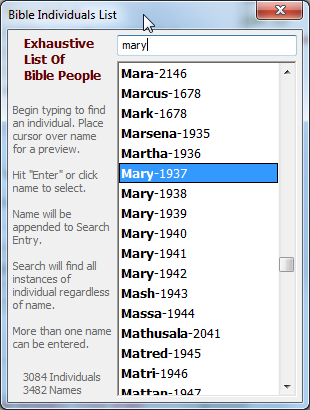
When a name is selected it will be entered into the Search Entry Box and the List closed.
To add another ID, open the People List again.
Multiple persons as well as other words can be entered in the Search Entry. For instance
a search for Jesus(Alt)-7300 life will find all verses with an alternate reference to Jesus
(pronouns, etc.) and the word life.
Hint:
Only the person ID is necessary for a search. The name is only there to help identify the
person associated with the ID. In the search above 7300 life will produce the same
results.
Note:
The Specific Individual Search utilizes a Boolean AND search similar to the Every Word
Search
Advanced Alternate Searching is also possible with this search method. See below for
details.
A character string will bring a match if the string is found anywhere within the text, even
between words. This option does not search for words but strings of letters.
Example:
If right is entered it will match right, bright, righteous, unrighteous, etc. If right a (a
letter or string with a single space and another letter or string) is entered, all
matches between words (such as bright and) will be displayed.
Exclude and Wildcard options are available with this search method as well.
Regular Expressions are advanced pattern matching characters that can be used to
develop quite sophisticated search methods. Special characters are used to represent
search strings.
Note:
Unlike other search options, the Regular Expression option will not automatically
compensate for the possibility of punctuation or italics/red letter tags between
words. These must be accounted for in the entered Regular Expression if
desired.
Advanced Alternate Searching
Advanced Alternate Searching permits the use of alternate words when searching in Every Word, Any Word, and Individual Search.
If alternate words are placed in parenthesis divided by the pipe symbol (word|word),
Bible Analyzer will search for either word along with any other words.
For instance, in Every Word Search if (eternal|everlasting) life is entered, the search will
find every verse with eternal or everlasting plus life. The same is true for Individual
Search where IDs can also be entered like (eternal|everlasting) life (7200|7300). More
than one alternate group can be entered.
Wildcards can also be used such as (eter*|ever*) life.
If Search Multiple Bibles option is checked, Bible Analyzer will search all loaded Bibles
for the search query. The references only for each Bible will be displayed in the initial
display. To show the verses, as in a single Bible search, click the Show verses link in the
display and a new display will be generated.
To search only selected Bibles, check the texts desired after pressing the Texts Button.
If the Case Sensitive option is checked Bible Analyzer will search considering case.
Example:
Entering Lord will only find the capitalized Lord and ignore the lowercase lord.
If the Whole Word option is checked using the first three above Search Methods, Bible
Analyzer will only find the exact words entered as opposed to a string making up the
beginning of a longer word.
Example:
Unchecked entering right will find right and righteous, etc. Checked it will only
find right.
If the References Only box is checked, the display will only show the verse references
instead of the entire verse.
The Words Button will bring up a Dialog with a list of all the words found in the current
Bible to aid in word entry. Simply begin typing a word and the list will scroll to the
corresponding entry. Either press Enter or click a word to append the word to the Search
Entry Box and close the Dialog.
Note:
The Words Button will not show a word list for Hebrew or Greek texts.
When the search results are displayed, at the top of the display will be a bar chart
representing the relative amount of hits in each book (see image below). If the search
results are more than 300 hits, click the drop-down box at the top of the display to select
a different 300 hit range. This chart only reflects the results in the current 300 hit
instance.
The book name before the colored bar is also a hyperlink. Click the book/link and the
display will jump to the first results of that book.
Note:
The chart display can be disabled in Preferences.
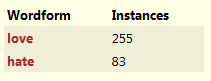
Also, When multiple words are searched for or wildcards are used, if more than one
wordform is found in the results, a Wordform chart is generated to show the differet
wordforms found,
Furthermore, a more detailed and Interactive Chart can be generated from the search
results. See the Results Panel page.
An alternative method of searching the Bible texts is to Right-Click on a Bible word in the
Bible Window Panel and select Search for "word" in Current Bible in the menu.
Bible Analyzer will enter the word in the Search Entry Box and show the results
normally.
Tip:
Bible Analyzer can search for Hebrew and Greek words and also Strong's
Numbers using the Right-Click Context Menu search.