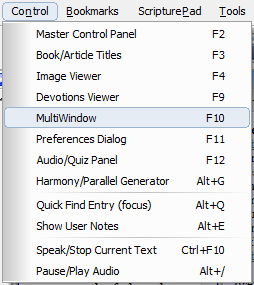
The Menu has six main menus,
· File
· View
· Control
· Bookmarks
· Tools
· Help
· Select All on Current Page Ctrl+A
This selects all the text in the panel that has the current focus. To give a panel focus,
simply click the mouse somewhere in it.
· Copy Selected on Current Page Ctrl+C
This will copy to the Clipboard any text that has been selected and has the focus.
Selection can be made by dragging the cursor over the desired text and highlighting
it. It is preferred that the Copy button be used in the respective toolbar.
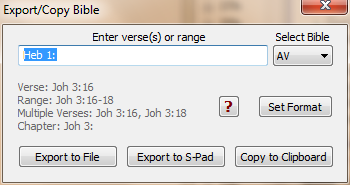
· Export/Copy Verses Ctrl+E
Opens a dialog that will export a verse range to File, S-pad, or Clipboard.
Note:
Contiguious and non-contiguious verses and/or verse ranges can be entered
separated by a comma. For Example, Joh 3:16-18, 36, 5:5, Act 2:38, Heb 4:1-6,
Phm, Rev 4, will export all verses chapters and books.
· Print Current Page Ctrl+P
Print the page with the current focus.
· Print Preview Current Page Alt+Ctrl+P
Previews the page with the current focus.
· Exit Alt-X
Closes Bible Analyzer.
· Toolbars
Allows hiding/showing of the five toolbars.
· Select/Create Layouts
Used to select or create a new window layout. This is the same menu as the L button
on the MultiButton Control
· Expand/Contract Bible Alt+B
· Expand/Contract Dictionary Alt+D
· Expand/Contract Results Alt+S
· Expand/Contract Commentary Alt+C
These will expand and contract (Toggle) their respective Panel, the same as the Toolbar Buttons.
· Hide/Show Tree Panel Alt+T
This will hide and show the Bible Tree.
· Collapse Bible Tree Alt+L
If several chapter selections have been made in the Bible Tree
many of the Bible
Book Nodes can be expanded making navigation more tedious. This function will
collapse the Tree back to it initial state with only the current book expanded.
· Next Verse F6
· Previous Verse F5
· Next Chapter F8
· Previous Chapter F7
These will function as described, selecting a new reference in the Bible Window.
· Next Verse With User Markup Ctrl+F6
· Previous Verse With User Markup Ctrl+F5
· Next Verse With Static Markup Alt+F6
· Previous Verse With Static Markup Alt+F5
These functions will scroll through the verses with markup
· Next Book Chapter Alt+F6
· Previous Book Chapter Alt+F5
These will advance/retreat through the chapters in the Book/Article Viewer.
· Toggle Bible Reference Panel Ctrl+R
Will Hide/Show the Bible Reference Panel.
· Increase Window Font Size Ctrl++
· Decrease Window Font Size Ctrl+-
· Master Control Panel F2
· Book/Article Titles F3
· Image Viewer F4
· MultiWindow F10
· Preferences F11
· Devotions Viewer F9
· Audio/Quiz Panel F12
· Session Manager Ctrl+M
· Harmony/Parallel Generator Alt+G
These open their respective viewers or dialogs the same as the Toolbar Buttons.
· Quick Find (focus) Alt+Q
· Show User Notes Alt+E
These set the focus to the appropriate box for quick entry.
· Highlight Selected Bible Text Ctrl+H
Will highlight the text the same as the toolbar button.
· Export Selection Verse range To ScripturePad Insert
When a selection is made in the Bible Panel, starting and ending in any part of a
verse, pressing the Insert key will export the entire verse range to ScripturePad.
· Paste References From Clipboard Shift+F1
Will scan the current clipboard data for verse references and display any found as
live links in the MultiWindow.
· Paste References From Clipboard With Verse Text Shift+F2
Same as Paste References above but also includes the verse text of reference in the
MultiWindow. For references that have verse spans (John 3:16-18), only the initial
verse will be listed (John 3:16).
· Paste Clipboard Text With Linked References Shift+F3
Pastes the entire clipboard text with the Bible references as live links.
· Speak/Stop Current Text Ctrl+F10
· Pause/Play Audio Alt+/
These function as described.
Up to ten verse bookmarks can be entered under this menu, Alt+1-10
Bookmarks can be changed by holding the Shift key while selecting a menu item and
entering a new verse.
· Module Download Manager
This will open the Download manager for downloading Free and Premium Modules
· Download Purchased Modules
This dialog will guide the downloading of purchased modules from the Bible Analyzer
Store
· Extract Local Module Archives
This tool is not normally used except for special purposes
· Export User Notes To File
Will export User Notes to a file suitable for making them into a Commentary File.
· Display Primary Modules Folder
Will open the default Modules Folder in Windows Explorer.
· Display User Modules Folder
Will open the User Modules Folder (usually in [My] Documents) in Windows Explorer.
· Display User Data Folder
Will open the User Data Folder in Windows Explorer (config.ini, notes.usr, etc).
· Reset Default Settings and Restart
Will reset the default settings.
· Show Help F1
This open this file (help.chm) the same as the Toolbar Button.
· Check for Update
Checks the server at www.BibleAnalyzer.com for a newer version. If found, the
option is given to download the setup file to the desktop.
· BibleAnalyzer.com Forum
Opens the default browser to the Bible Analyzer users forum
(www.BibleAnalyzer.com/forum).
· View Welcome Page
Opens the Welcome Page that is shown on first start.
· About Bible Analyzer
Shows the About Dialog.